Accessibility Resource Center Skip to main content
Personal Business
Contact us
Support
Mobile
Mobile
  • Deals
  • Smartphones
  • Plans
 
Internet
Internet
  • Business Internet
 
Solutions
Solutions
  • All products
  • By industry
  • Small business
  • Enterprise
  • Public Sector
  • Solutions overview
 
Insights
Insights
  • Why Verizon
  • Customer success stories
  • All resources
 
Log In

Log In

Personal Business
Contact us
Support
end of navigation menu
  • Home
  • Support
  • equipment devices services
  • routers
  • Verizon Business Internet Gateway ASK NCM1100E
  • Equipment, Devices and Services
  • Wireless devices
    • Learn about my device
    • Get eSIM support
    • Unlock my device
    • User Guide Library
    • Bring your number to Verizon FAQs
  • Routers
    • Verizon Router
    • Fios Router
    • Fios Quantum Gateway
    • Actiontec GT784WNV
    • D-Link 2750B Gateway
    • Verizon Business Internet Gateway XC46BE
    • Verizon Internet Gateway Business FSNO21VA
    • Verizon Business Internet Gateway ASK-NCM1100E
    • Verizon Internet Gateway for Business (ASK-NCQ1338E)
    • Arris NVG558 LTE Router
    • Discontinued networking equipment
  • Extenders
    • Verizon Wi-Fi Extender
    • Fios Extender
    • Fios Network Extender
    • Wi-Fi Extender
  • Traditional Phones and VoIP
    • Business Digital Voice
    • Troubleshoot your traditional phone
    • Learn about calling features
    • User Guide Library
  • Fios TV Equipment
    • Set-Top Boxes
    • Additional Set-Top Boxes and DVRs
    • Remote Controls
    • Digital Adapters
    • CableCARD
    • Accessibility
    • Verizon's Small Networking Equipment (SNE) Energy Information
  • Equipment returns
    • Fios Internet Services
      • Fios Internet
      • FAQs
    • Fios TV Services
      • Fios TV installation
      • Fios TV required equipment
      • Fios TV message center
      • Fios TV Troubleshooting
      • Fios TV features
      • View Fios TV programming
      • Local Franchise Authority Contact Information
      • Fios TV Annual Notice
      • Frequently Asked Questions

    Equipment, Devices and Services

    Verizon Business Internet Gateway ASK-NCM1100E

    Virtual Setup Assistant

    For in-depth troubleshooting and support information on the Verizon Business Internet Gateway - (ASK-NCM1100E), please explore the following topics:

    • Verizon Business Internet Gateway - Setup Video
    • Verizon Business Internet Gateway - Quick Start Guide
    • Verizon Business Internet Gateway NCM1100E inBox - SetUp Guide
    • Verizon Business Internet Gateway - User Guide
    • Verizon Business Internet Gateway NCM1100E Mounting Bracket - Installation Instructions
    • Verizon Business Internet Gateway NCM1100E Paddle Antennas - Installation Instructions
    • Extended Antenna Mount (ASK-CDLANT) - Quick Start Guide
    • External Battery (ASK-NCMBBU) Quick Start Guide
    • External Battery (ASK-NCMBBU) User Manual
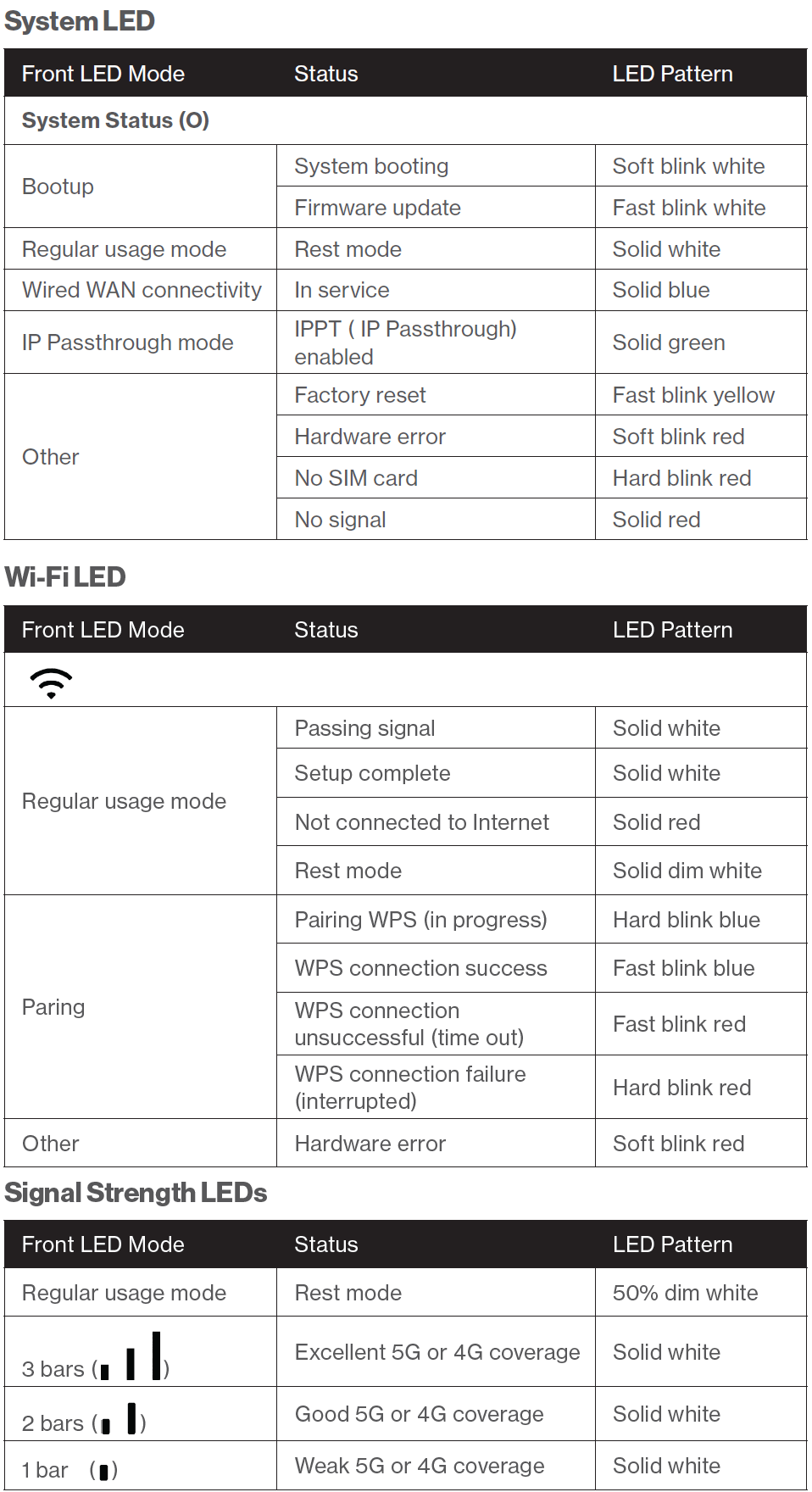
    Tall|ask ncm1100e indicators.png

    Verizon Business Internet Gateway ASK-NCM1100E FAQs

    Contact the Verizon Business and Government Customer Operations team (BGCO) at 1-800-922-0204 to add features (e.g., plan changes such as Static IP.)

    Visit My Business Wireless for more device information and to manage your device remotely, such as configuring primary and secondary Wi-Fi or rebooting remotely.

    Log into the Verizon Business Internet Portal to remotely view and manage your Business Internet routers.  In the portal you will be able to see a list of all your routers, network information such as signal strength and online/offline status, ability to configure features such as Wi-Fi Name/Passcode, perform a reboot or speed test and see all your devices connected to the router.

    Note: Not all features are available on Bring Your Own Device and Arris Routers

    Existing customer?

    Sign in to your Verizon business portal to view and pay your bill, order products and services, manage your router, access security settings and more.

    Manage account

    Sign in

    Manage equipment

    Manage router

    Customer Learning Portal

    Open portal
    40